
Find Wi-Fi dead spots and the best place for your router
To find dead spots, walk through your home with a signal meter and note the reading in every room, especially where you actually use your devices. Then fix the weakest areas: move the router to a higher, more central, open spot first, and only add an extender or mesh node if that isn't enough. Place an extender halfway between the router and the dead spot, not in the dead spot itself.
What makes a dead spot?
Wi-Fi is radio. It gets weaker with distance, and every obstacle takes another bite out of it. Some materials are much worse than others:
- Concrete, brick and stone walls, especially load-bearing ones and floors between levels.
- Metal: refrigerators, filing cabinets, radiators, metal doors, foil-backed insulation and some window coatings.
- Water: aquariums, water heaters, even a full bookshelf of paper absorbs some signal.
- Mirrors, which often have a metal backing.
- Microwave ovens, which leak noise on 2.4 GHz while they run.
Drywall and wood cost relatively little. Two rooms away through drywall might be fine; one concrete floor might not.
The bands behave differently too. 2.4 GHz reaches farther and passes walls better but is slower. 5 GHz and 6 GHz are faster but fade more quickly with distance and walls.
How do you map your Wi-Fi room by room?
You don't need special equipment. A phone that shows signal strength is enough.
- Start next to the router and note the signal. This is your best case.
- Walk to each room and stand where you usually use a device: the couch, the desk, the bed. Wait a few seconds for the reading to settle, then note it.
- Check the in-between spots too: hallways, stairs, the far corner of a long room.
- Note the band if your phone shows it. A room may have weak 5 GHz but usable 2.4 GHz.
- Run a quick speed test in the rooms that matter most. Signal strength tells you a lot, but speed is what you feel.
If your phone shows signal in dBm (a negative number like -62), closer to zero is stronger. As a rough rule of thumb, around -67 dBm and stronger is fine for streaming and calls, and below -75 dBm things start to struggle. See what a good Wi-Fi signal is for more.
Where should you put your router?
Placement fixes more dead spots than any gadget. The ideal spot is:
- Central. Wi-Fi spreads in all directions, so a router at one end of the house wastes half its signal outside or on the neighbors.
- High. On a shelf or wall mount, not on the floor. Signal spreads out and slightly down.
- In the open. Not inside a cabinet, behind the TV, or next to a fish tank or the fridge.
- Away from other electronics, especially microwaves, cordless phone bases and baby monitors.
- With antennas, if any, pointed in different directions. One vertical and one horizontal often covers multiple floors better than both straight up.
The router usually sits wherever the internet line comes into the house. If that's in a corner, a longer Ethernet cable to a better spot is often the cheapest fix there is.
Map your home again after moving the router, to see what changed.
When does an extender or mesh help?
If your home is large, has several floors or has thick walls, one router may not reach everywhere no matter where you put it. Then you have three main options:
- A Wi-Fi extender (repeater) picks up your router's signal and rebroadcasts it. It's cheap and simple, but it must receive a decent signal itself, and it typically halves the speed it passes on because it uses the same radio to receive and send.
- A mesh system uses several units that work together as one network with one name. The units coordinate how your devices move between them. It costs more but covers large homes better, especially models with a dedicated radio between units.
- A wired access point connected to the router by Ethernet gives the best performance, since the cable carries the traffic. If your home has Ethernet in the walls, this is the best option.
Where should you place an extender?
This is the most common mistake: putting the extender in the dead spot. If the extender can barely hear the router, it can only pass on a weak, slow connection.
Instead, place it about halfway between the router and the dead spot, where the signal from the router is still good. As a rough guide, aim for a spot where your phone still reads around -65 dBm or stronger from the router. The extender then has a solid link back and enough range to cover the dead area.
The same goes for mesh nodes: each one needs a good link to the next.
If your phone keeps holding on to the router after you add an extender or mesh node, see why your phone sticks to the wrong access point.
Doing it with WiFi Meter
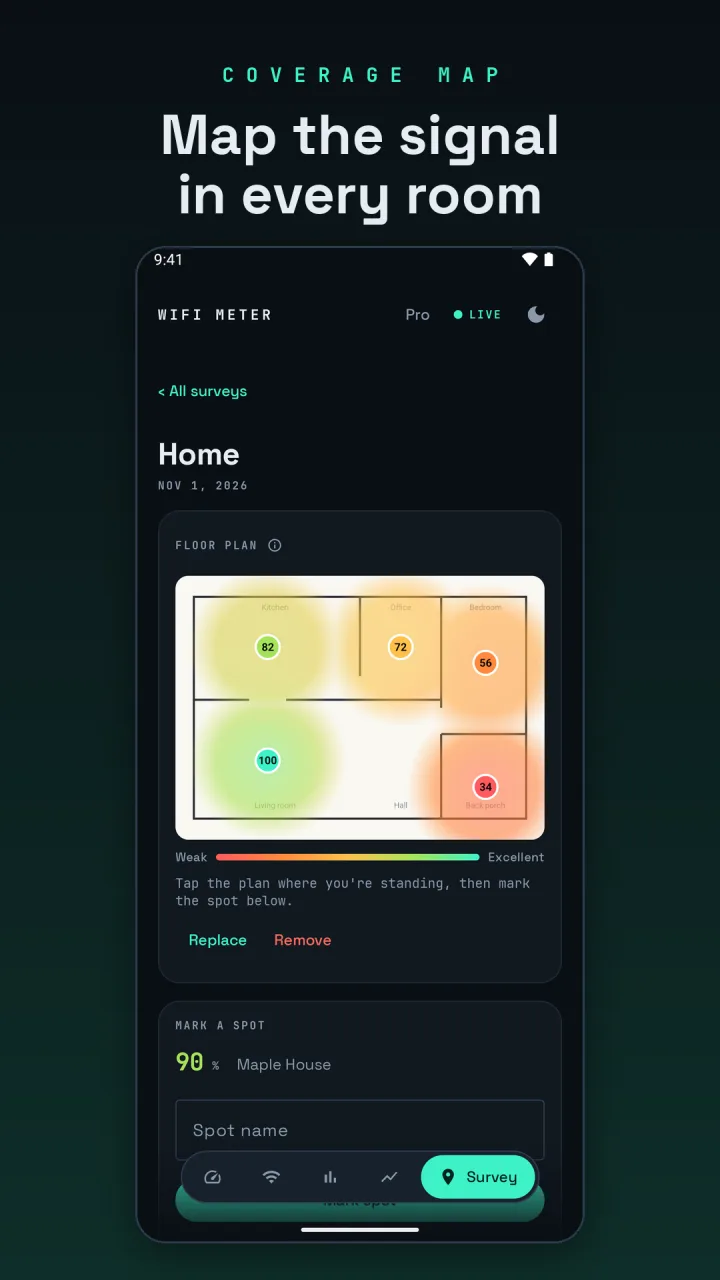
- Locate mode (free, on the Meter tab) turns the signal into sound or vibration pulses that speed up as the signal gets stronger, so you can walk around without watching the screen.
- Surveys (Survey tab) let you name each spot and record its signal, quality, band, channel and link speed, so you can compare rooms side by side. The free version has one survey with up to 5 spots.
- With WiFi Meter Pro you can add a photo or screenshot of your floor plan, tap where you stand before each reading, and see a coverage heat map estimated from your measurements. Areas far from any spot stay uncolored instead of being guessed. Surveys can be exported as a PDF report or CSV.
- Track this network (Pro, from the Networks tab) follows the signal of a network you're not connected to, like a new extender's network while you place it. Readings for other networks come from Wi-Fi scans, which Android limits to about one every 30 seconds.
WiFi Meter asks for location permission only because Android requires it for Wi-Fi scans. It never reads your GPS position.